
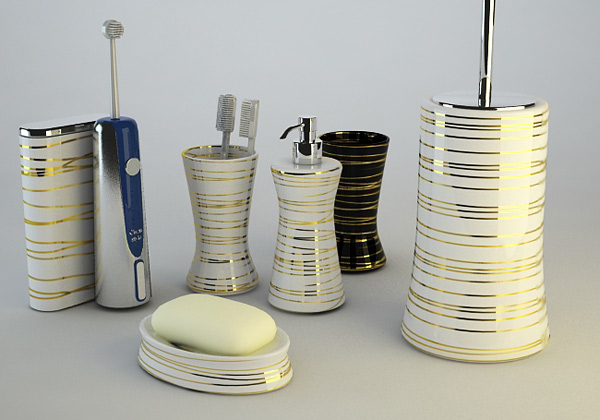
Do you like this image above? Probably you already downloaded my useful 3 Scene Template about interiors, exteriors and objects. Ok, go on with this great scene, full setted, totally free.
I made this rendering using 3ds Max 9 and Vray render… and I want to give you that scene as a present for you readers!
3d model to add nice ditails in bathroom scenes type. Toothpaste, toothbrush, liquid soap, box and something else with V-ray 1.5 high photorealistic setted scene. Just Clic render button and get a photorealistic shot!
I hope you’ll like my 3d files! It’s a good opportunity to investigate my V-ray settings, to compare my setting with yours… to help each other about settings and lighting concept.
Tell in your 3d forum, tell your friends…. Download and enjoy it.

 / Also Learn Corona Renderer


Very Very Thanks !!!
good studio lighting, the lightcache rocks :D, can you explain why you havent deactivated the “default lights” and although this the scene is well rendered ?¿ (when in common situations wihtout deactivate this setting the render is terrible awful)
thanks for share and greets
p.d.: the 3 scenes for diferent ilumination types are cool!!
Hello Jose!
I’m not totally sure… but I think that from V-ray 1.47 default light works until you put the first light in the scene. After it’s deactived automatically.
Thanks! It looks very good, and I’m sure it will be helpful.
Best regards,
Alex
a clear/clever replyyy, thank you 😉
wow….nice post
best regard
donza
I´ve just came out with your blog and have to say just: Congratulations! and many many thanks for the “sharing spirit” you have. I really appreciate all the stuffs within this blog. Well designed also! I added to my RSS feeds reader too. Thanks again and keep the good work!
thank!
i want learn 3d max studio9 ×32 thanks for help me
pleas tell me vray sun light setting pleas
Autodesk 3ds Max 9 vray downlod free plz year
Muchas gracias amigo. These free files will help ma a lot.
Thanks so much! I really needed this example!!
Thanks for this,very helpfull!!
I downloaded your file as is and the render only showes the higlights of objectson a very dark Background? Am running Max9 32 with Vray 1.5 Rc3? little help!
Good “studio” lighting! Thanks!
@ FRED
My file works perfectly with 3ds max 9 è+ Vray 1.5 Final (not rc3!)
your file is great!
i need copy for vray1.47
Excellent man!
thanks a lot!
good
Thanks so much! again
thankss
thank youuuu soo much for sharing these 3 scenes! its has really helped me aloooot. 😉 saved my life.
excelent
its great….
This is very good blog for 3d artist. I also have some 3ds max tutorial
thanksssssssssssss
i need copy for vray1.5 r3
Thanks! It looks very good
Thanks. You save me.
good stuFf myT!
thank uuuu sooo much…
thaks!
it is very useful
Thanks, I will check it soon.
Thx for this tutorial
ooooops… Almost 3 hrs on my PC, (3 Ghz with 1 GB Ram… 🙁
No diffuse map included…!
Hi Cirosan,
Thanks for this such a nice scene.
I just have one questions. What was the render time for this scene ? I just finished and it took more then 3hrs.
Waiting for your replay,
Stefan
thanks a lot
Hello, I`ve just downloaded your scene. It`s very nice when rendered, but when I save it as a jpeg the colors look very pale. I work with max 2010 and vray 1.50 SP4. Please help me :))))
Vray in the best renderer in this field till now.
Also you can use vRay 2.0 in your upcoming tuts, it has alot of great new features, Thanks for this great blog 🙂
Thanks a lot for the scene sharing.
Thanks God… I rendered the scene in 32 seconds with my new system.
But it has some noise there, do I have to change subdivision level for other 2 lights upto 20?
I will share soon this scene here with some new settings I have just learnt.
Good Luck!
Hi Cirosan, I just rendered the scene without fame buffer option & it was too white without yellow light. . . what’s wrong there?
Ok, here are the settings with render times:
Your Image sampler:
Type – Adaptive DMC
A/Alias Filter – VRay Sinc Filter
32 Sec.
My settings…
Type – Adaptive S/Division
A/Alias Filter – Area
28 Sec.
All lights sampling = 20
29 Sec.
OK, here is my result with my material map:
http://i55.tinypic.com/mrthlg.jpg
640 x 480 Time: 1 min. 11 sec.
Any how, THANKS a lot to share it.
Can I share the final render of this scene on net with this forum link…?
Good Luck!
muito bom obrigado pela ajuda amigo estou aprendendo agora
preciso da sua ajuda porque estamos muito loge dessa tecnológia que
vocês tem. gostaria se for possivél manda alguns projetos pra mim estudar
vesão 3dmax2009 faleu amigo muito bom seu trabalho
robson farias
cidae de breves ( ilha do marajó amazônia )
thx for good tutorial!
A formidable share!
Hi,
Can you please help me? I subscribed, but I get the message: “Not Found
The requested URL /file/…zip was not found on this server.
Additionally, a 404 Not Found error was encountered while trying to use an ErrorDocument to handle the request.”
I would like to get the file, thank you.
Hi ROSS,
in these last day we had a terrible experience with the host. We are uploadinf everything little by little. Tell me if something is wrong. Thanks!
Thank you! I could download the file now! 🙂
map missing in the soap file
No problem, Praveen… the scene works fine anyway 😉