
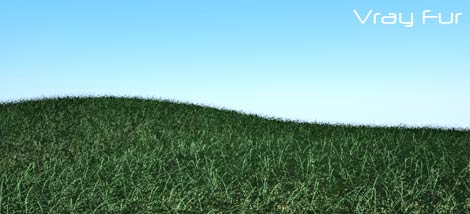
In the last file I showed you how to set VrayDisplacement to obtain realistic grass or carpets. It’s a good solution for middle camera shots.
But how can do if your grass is really near to the camera? You need more details to obtain a realistic render, so it’s time to use Vray Fur!
if you need more information about V-ray fur you could have a look to the official V-ray guide: Vray Fur.
If you need same nice tutorial to understand how to create a grass with vray fur have a look here: Vray Fur tutorial
If you want a very nice scene (xp Style!) to just clic “render”… Â download my gift!

Free Scene: Grass with Vray Fur
[ 3ds 8 – vray 1.5 ]
 / Also Learn Corona Renderer


Hey, I’ve see this link in Evermotion, and I enjoy it a lot.
I didn’t know this plug-in, do u believe? And few days ago, I was trying to create grass using particle systems in a non-uniform plane, aff!!!
Now I know how to do, thanks a lot,
Hugs
Pedro
thanks for your instruction, it’s help me to save my time much!
Is there a Vray fur for Rhino?
thx man..i neeed this one..
thank sir my is naseer i am a 3damx operator
Hello,
Is there any way to apply some wind to this?
thanks a lot, was waiting for this for some time, will check it out now 🙂
Thanks a lot , can u tell me about vray plants
I received the both of tutorials Its Really too good & thank you very much. can you help me more—- You know i want to improve my architecture rendering- look like professional architect render image or realistic water pool rendering
But again thanks for these tutorials
(realistic grass or how to reduce
render time.)
tanks alot!
Thank,s a lot Ciro Cannino, you’re explainantion is very helpfull to me
Hi ciro.
nice trick and so helpful to me.
thanks.
you are my hero Sir………THANXX ALOOOOT
Haya dear Ciro
I just wanna thank you for everything.
your fan.