
(Warning: the following post’s related to 3ds Max, but is applicable to any software provides polygonal modeling)
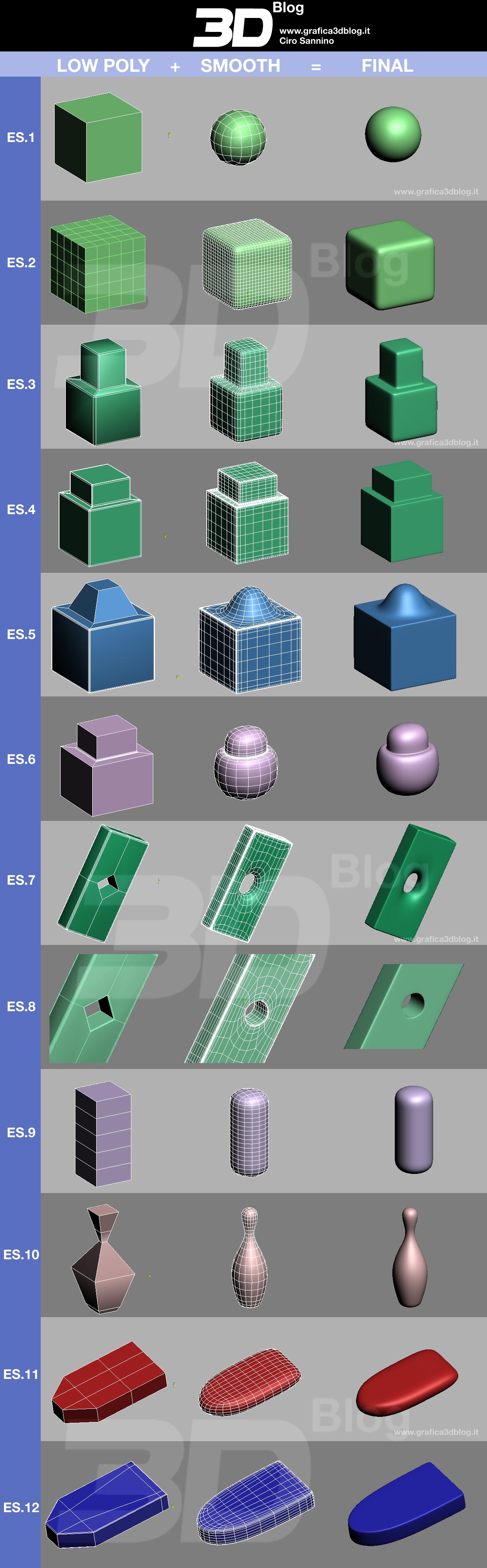
Among the 3ds Max modifiers, there is one – EDIT POLY – that rather than a lot of parameters, in fact there’s a “world” behind: the world of the polygonal modeling!
Polygonal modeling (nurms)  is an approach for modeling objects by representing or approximating their surfaces using polygons and 3ds Max especially  works in this way.
One of the most important things is to assimilate the “combination” of 3d low poly models with modifiers like MeshSmooth or TurboSmooth in order to get smoothed objects.
The typical application is: Primitive Geometry + Edit Poly + Meshsmooth (or TurboSmooth)
But the most important thing is to understand << What polygonal mesh I need to get the 3d model I want?>>. (Is supposed: “using meshsmooth modifier”).
My last sentence is crucial, so you I recommend you to read it again carefully: it is the focus of polygonal modeling. (I feel sorry for my poor english)
In this article will not explain how to handle technically the Edit Poly because there are tons of tutorials and videotutorial too.
I have prepared an image that I call TABLE’S SMOOTH because it contains 12 examples of basic items: they are what you get adding a Smooth modifier to a Low Poly model.
Observe my “table”: I hope it will help you to develop the awareness you need in order to get the smoothed object you want.

 / Also Learn Corona Renderer


Thanks for this, I’m currently learning 3DS Max after a long absence from it, and this is a very good article because it puts across how important it is to fully understand the power of Editable Poly and how the underlying geometry will affect the Meshsmooth result. Thanks for sharing.
……Useful 😉
best regards!!
Thanks for sharing.Very useful.
very thanks ciro sannino from your gifts
thanks for shairing i will definetly try this
will this reduces the rendering timr after using mesh smooth also????
tnx ciroooo 🙂
Thank you very much ciro….:o)
thanks for you. thanksssssss
it is nice concept for develop the modelling.
its really cool thx 😀
Hiee..
it seems good stuff.keep posting.
thanks for you
nice and cool stuff
thanx 1nce again
That is wonder full that so much there,,,, i learned lots of things:))
I found this tutorial by Grant Warwick on Autodesk Area.
http://area.autodesk.com/tutorials/inorganic_modeling_fundamentals_part_1
It helped me tredmendiously with box modelling.
That`s very good idea. It can give a clear image to beginners but could be a handy “reminder” for advanced users same time. Specially when making holes and chamfers.. thanks buddy for sharing it,
very good tips..easily can get ideas frm this tutorials….thnks
muito bom…..mesmo
gostaria ser for possivel de um template-vray-exterior 2009 pra um maquete eletronica
casa
useful lesson for leaning polygon modeling.
thanks for sharing.