
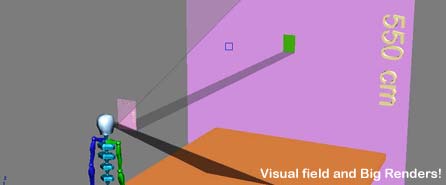
Recently I rendered a lot of 6m x 3m Posters for Buildings under construction… and I want to share with you my idea to choose how many pixels I need setting my rendering panel.
Everyone knows that a book is printed in 300dpi: that’s the best standard resolution.
But if I see this book to 5 meters I don’t need to increse the resolution, I’m not Superman!!! I just need to increase the format. That means I’m reducing the resolution!
Ok.. look at this file: it will explain my idea in a look!
- The Visual field – 3d sketch – Formats: File for 3d studio 9 / *.3DS
- If you don’t use 3ds > Images 1 – 2
Considering the Visual Field: looking a book (21cm x 29,9cm) to 30 centimeters is the same thing than looking an imaginery Big Book (574cm x 395cm) to 5 meters!
So, this imaginery book is 19 times bigger than an ordinary book: that means I can print a big poster with a resolution 19 times smaller: 300 dpi / 19 = 16 dpi!!!It will be a good resolution.
 Checking resolution
If you want to check your rendering resolution, print a little part (20dpi!).
The quality image is not so good, but just see the printed paper to 2 meters: Perfect!
This is the method I use to verify the quality image.
Concluding
To print a 6m x 3m rendering:
- Set rendering out to 4724 x 2362 pixel
- Create a new document with Photoshop (6m x 3m / 16dpi)
- Put your rendering into new photoshop document
Last suggestions
- I prefer 20dpi that 16dpi… it’s my safety margin
- You can render 80% and increase up to 100% with Photoshop: Render time will be cutted and nobody will notice that
- If you have problem with memory errors, render your image in 2 parts
Et-voilà , Les jeux sont faits!
 / Also Learn Corona Renderer


Nice tip, thanks.
Oh, “E-voilà , Les jeux sont fait!” should be “Et voilà , les jeux sont fait!” 😉
Tom
Tom!!! C’est vrai! mais il manque encore quelque chose: “-” 😉
Merci bcp… c’est parfait maintenant!! hehe 🙂
Thanks Tom!! (je le sais… tu es français!)
Even better (there still is a mistake in the sentence) : “Et-voilà , les jeux sont faits”.
Il manque un ‘s’ 😉
Tom
Touché! 😀 lol
i couldn’t agree more! i’ve used this principle with printing of large digital pictures
I’ve always said that rendering something larger than 5000 pixels wide is pointless in 90% of the cases. I am glad I’m not the only one thinking this way 🙂
nice tip!!!, grande maestro!
Como las cosas geniales, de una simplicidad aplastante, y una lógica inequivoca. Cuantas peleas he tenido con este tema. Nunca hice un croquis como el tuyo en 3d que se explica por sà solo.
Gracias por el sharing power
very very good…………………………..
very……….. very …………….good…………………………..
Como las cosas geniales, de una simplicidad aplastante, y una lógica inequivoca. Cuantas peleas he tenido con este tema. Nunca hice un croquis como el tuyo en 3d que se explica por sà solo.
Gracias por el sharing power
I’ve always said that rendering something larger than 5000 pixels wide is pointless in 90% of the cases. I am glad I’m not the only one thinking this way
@ MUNEER KAPPAN
Parece que de verdad te gusta dejar tus comentarios por aqui! jeje..
Gracias por tus palabras 😉
Pl help me when I render 3d image its look some bright and when I save this render as jpg or some format then its look Darker !!
I don’t know what it is ? I go for uninstall and re install 3d max 9 but problem is still same !!
Qué polÃglota Ciro! ^^
Nice post, thx!
Nice tip, thanks.
Estoy muy agradecido por cada uno de los informativos leer aquÃ. Yo, ciertamente, se extenderá la frase acerca de su sitio con la gente. Saludos.