
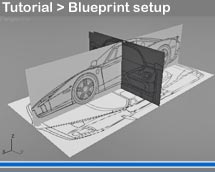
[Modeling] Many models start with a blueprint setup… but what’s means “Blueprint”?
A blueprint is a type of paper-based reproduction usually of a technical drawing documenting an architecture or an engineering design. More generally, the term “blueprint” has come to be used to refer to any detailed plan… and usually these plans have a blue background with white writes.
To models animal, characters, or cars, vehicules… we need a blue print and we have to setup it on our 3d software. But what’s the fast way to do that?
Don’t worry, I found 7 useful tutorials – for the most famouses 3d software – that will help us to get faster setting a bluprint!
Here the 3d software: Setup blueprints for…
To model my first 3d car I followed the 3d studio max tutorial: it’s very easy and fast.
 / Also Learn Corona Renderer

