
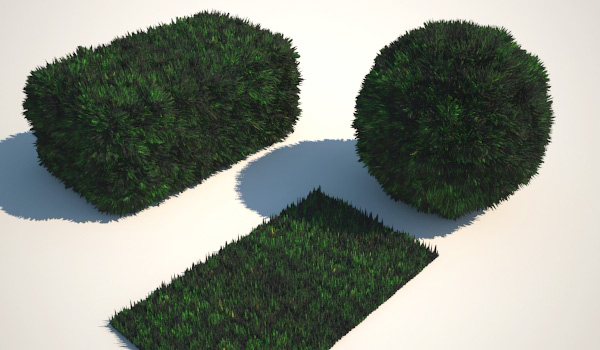
Vray displacement is a very helpful modifier if you want to give more realism to your scene creating 3d grasses and carpets. Not just using textures… ( More V-Ray Tutorials! )
VRayDisplacementMod modifier uses an assigned texture to extrude polygons during the rendering, in fact this modifier doesn’t produce effects in the viewports.
For examples to create a good 3d grass you create a box with many segments, apply noise modifier and with VRayDisplacementMod modifier extrude the box: the grass is done!
I don’t want to give you a boring tutorial so here my scene, free!

> Download now:Â Grass and carpets with Vray Displacement | 3d studio 2009 + Vray 1.5
> Download now: Grass and carpets with Vray Displacement | 3d studio 8 + V-ray 1.47.02 or higher
Enjoy it!
 / Also Learn Corona Renderer


Hi,
Excellent tutorials, can you please save your tutorial files in studio max 7 format and please mail them to me or give me a link.
Nice trick, I did a scene with this technique some time ago, the result is here : http://www.pixelab.be/boss/index_boss.html I’ll try to find time to share my own mat on my blog 😉
Hi
I really like this effect, looks really good. Just wondering if you think this is the way to go with a large surface area, in a landscape sort of rendering? I am using your settings right now on a really large surface and it’s taking a really long time. Perhaps I just need to tweak the settings, or maybe it’s the wrong way altogether?
your thoughts please…
thanks
simply beautiful and effective
Very fantastic thank’s this tutorial
This is great! I love your tips on VRAY renders… I never knew it could get that easy. I’m new with VRAY and your site is essential!
hey man cud u tell me wht parameters u have used to hide the sides faces of chamfer box plzzzzzzzzz tell me and wht is the roll of segments ?????
HELLO, I’M A NEW VRAY USER, I DONT KNOW HOW TO INSTALL IT.
SOMEONE CAN HELP ME?
THANKS
Tank’s so much….it very helpfull…..
I have been lose my mine in very long time just for findit this tutorial……
and now you gif me the tutorial..
I am so happy…..and tank’s so much…..
Hello, thank you for sending vray Displacement to obtain realistic grass or carpet. It will help us to better output learn new ideas from u once again thank you .