
Modeling architectural profiles for ceilings (or roof) could be really boring! But from today you can do it easly thanks to a great script for 3ds Max… you just will need 2 seconds!
Usually we don’t need to create a specific cornice, the most of times we just need details to add. For this reason modeling architectural profiles it’s often a waste of time.
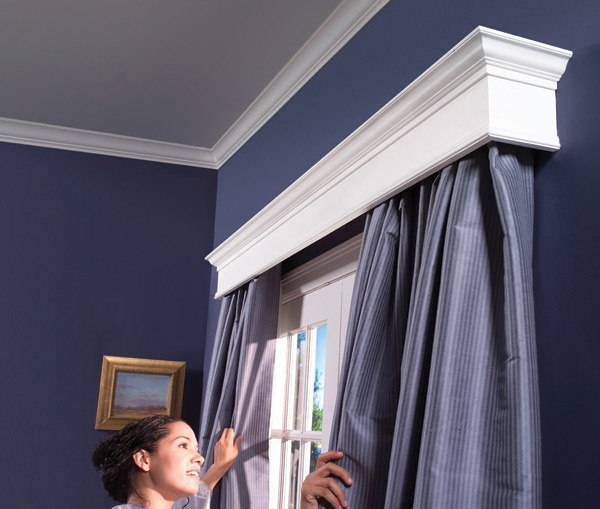
Some day ago I discovered a great script for 3ds Max! Its name is Sweep Profile and it add classical architectural profiles to sweep modifier.
Sweep Profile is part of a script pack that contains other interesting scripts. In this post I’ll just talk about Sweep profile.
- From the genial Alex Kramer download the script: search for “Download ScriptsPack” button!

Open 3ds Max and drag&drop “Script Pack” in a viewport. This windows will appears:
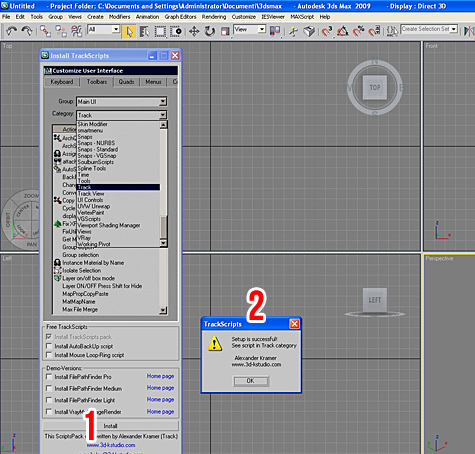
1) Clic INSTALL button  in order to install the script
2) This message will notice that everthing is ok! We have the new scripts in the Track Category.
Now close 3ds MAx and follow my video:
Get a Free Corona License: Learn Corona Renderer


Great Tip thanks a lot
wow great thanks..
hi
thanks for sending me a great tip .i am using 3d max2009.i followed your guidance my script installed successfully.But sorry to say that when i am trying to apply sweep modifier on it and press the shortcut ctrl+shift+s an error open>>>>>
–Runtime error:dotnet runtime exception:value of ‘100’is not valid for’value’.’value’should be between ‘Minimum ‘and ‘maximum’.
Parameter name:Value
can you please help me to solve this problem 🙁
Hi Muneer,
I used CRTL+SHIFT+S but you can assign the key combination that you want.
Can you assign a new combination to “Sweep profile”?
Did you complete this step?
i have got a error please solve it
–Runtime error:dotnet runtime exception:value of ’100′is not valid for’value’.’value’should be between ‘Minimum ‘and ‘maximum’.
Parameter name:Value
thanks
It worked with me: 3ds max 2009…. what version do you have?
hello sir,
thanks for reply
i assigned a new key combination to the “sweep profile “and i also search the answer of this error on alex kramer forum but i could not find the answer 🙁
hi,(problem solved)
my problem –Runtime error:dotnet runtime exception:value of ’100′is not valid for’value’.’value’should be between ‘Minimum ‘and ‘maximum’
got solved that was the .net problem we need to install latest vesion of .net from this link http://www.microsoft.com/netframework
thanks to you and mr.alex for this script 🙂
Great Muneer,
I’ll add your information in my post asap 🙂
Good”!
Hi Ciro Sannino.
how to create realistic image.
Dear BOMMA,
impossible to answer your question here.
thanks very nice
wow thanks for sharing
THANKS a lot for this Help Sannino… Good Luck!
Thankyou It helped me a lot.
i have 3ds max version 2010….i followed all the downloading step and i dont have any problem in installation however whenever i click on customize > customize user interface…everything on my pc gets stuck or rather hang and my software shuts down…Please Help!!
At last! Someone who understands! Thanks for posting!
wow thts nice script thanks to share us it really help fulls i were use loft to specific cornice but now i m use this script
Hi Sanni
Thanks a lot yaar, for sharing a great experience, we r gettin lot from u, hope we will.
thank you very much, very useful stuff, and most critical stuff, thanks a lot,
I’ve been exploring for a little for any high-quality articles or blog posts in this kind of space . Exploring in Yahoo I ultimately stumbled upon this website. Studying this info So i am glad to convey that I have a very excellent uncanny feeling I found out just what I needed. I so much for sure will make certain to do not omit this website and provides it a look on a relentless basis.
Where i can download? The link is error, always direct to yahoo 🙁
thanks
Hi Shirocan,
I updated the link with a page to download: http://3d-kstudio.com/scripts/trackscripts/
Enjoy 🙂
THanks for the Script Ciro 🙂
Thanks for Script.
hi
Great tips
Thank you very much
Hi, thanks for sharing a great tutorial. I’m using 3d max2010. I followed your guidance my script installed successfully.But when I am trying to apply sweep to the model but I can’t adjust the scale coz there are not scale button to adjust only have interpolation and size to adjust, btw my version also different from you so where I can scale the model? Thx.